
Login
Start Free Trial Are you a business? Click Here

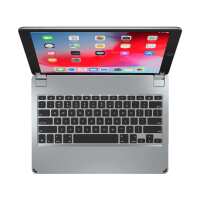
Brydge 12.9 Reviews

4.2 Rating 2,618 Reviews
Read Brydge Reviews

About Brydge:

We are the fastest growing tablet keyboard brand for the Apple iPad and Microsoft Surface. Alongside our award-winning keyboards, we offer a range of premium mobile and desktop accessories including Vertical Docking Stations for MacBooks and Surface Laptops, Docking Stations for Apple and Windows setups, Leather Organizers, Screen Protectors and Protective Cases.

Visit Product Page

Phone:

(435) 214-7485

Email:

support@brydge.com

Location:

1912 Sidewinder Drive,
Suite 104,
park city
Utah
84060

It takes too long to pair. When I want to multi- use the bultooth I can’t cause the keyboard has it.
Helpful Report
Posted 7 years ago
It’s been about 8 days since I started using my Brydge 12.9 Bluetooth Keyboard. I picked up the Protection Package that included the keyboard back cover and the screen protector. I have paid very close attention to the looks, the protection as well as the workings of the products. I am please that this enhances the appearance if my iPad Pro 12.9 unlike the Otter Box that hid the iPad Pro from my view. My iPad Pro now stands out and turns heads every time I pull it out for use. It has also become a welcome edition to my Oak Desk in my home office. The key strokes are smooth deliberate and accurate. The back light is something that I really don’t use a lot but when I do its a welcome add on. I am so very happy to have made the decisions on this purchase. I really don’t use my MacBook much anymore, maybe about 5-10% of the time anyway. I pickd up a Thule case from BestBuy that was actually made for the MacBook Pro 13.3” and it works great with the iPad Pro 12.9” with the Brydge Keyboard. If anyone is on the fence about whether or not they should make the jump to Brydge Keyboards, I would tell them to jump in with both feet. My keyboard still holds a 99% charge and I use it everyday at work, though I don’t type a lot it still gets used several time a day.
Helpful Report
Posted 7 years ago
It’s been about 8 days since I started using my Brydge 12.9 Bluetooth Keyboard. I picked up the Protection Package that included the keyboard back cover and the screen protector. I have paid very close attention to the looks, the protection as well as the workings of the products. I am please that this enhances the appearance if my iPad Pro 12.9 unlike the Otter Box that hid the iPad Pro from my view. My iPad Pro now stands out and turns heads every time I pull it out for use. It has also become a welcome edition to my Oak Desk in my home office. The key strokes are smooth deliberate and accurate. The back light is something that I really don’t use a lot but when I do its a welcome add on. I am so very happy to have made the decisions on this purchase. I really don’t use my MacBook much anymore, maybe about 5-10% of the time anyway. I pickd up a Thule case from BestBuy that was actually made for the MacBook Pro 13.3” and it works great with the iPad Pro 12.9” with the Brydge Keyboard. If anyone is on the fence about whether or not they should make the jump to Brydge Keyboards, I would tell them to jump in with both feet. My keyboard still holds a 99% charge and I use it everyday at work, though I don’t type a lot it still gets used several time a day.
Helpful Report
Posted 7 years ago
Great
Helpful Report
Posted 7 years ago
I have purchased a Brydge since my original iPad, this being my fourth. It is the perfect compliment to an iPad, and this newest version for iPad Pro 12.9 is even better than the first. The keys are more solid and usable, as is the feel while typing as I am now. The hindges are even better, in removing the iPad Pro, even with a screen protector. I give this version 110%
Helpful Report
Posted 7 years ago
Absolutely perfect for me. I am thrilled!!! I got this fir mh ipad and it dies not topple over when moving the ipad dir sight.
Helpful Report
Posted 7 years ago
Perfection!
Helpful Report
Posted 7 years ago
The only thing that would make it better is if it could be attached to the iPad in the portrait position.
Helpful Report
Posted 7 years ago

