
Login
Start Free Trial Are you a business? Click Here

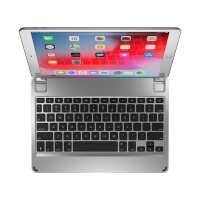
Brydge iPad Air 10.5 Series II Keyboard Silver Reviews

4 Rating 834 Reviews
Read Brydge Reviews

About Brydge:

We are the fastest growing tablet keyboard brand for the Apple iPad and Microsoft Surface. Alongside our award-winning keyboards, we offer a range of premium mobile and desktop accessories including Vertical Docking Stations for MacBooks and Surface Laptops, Docking Stations for Apple and Windows setups, Leather Organizers, Screen Protectors and Protective Cases.

Visit Product Page

Phone:

(435) 214-7485

Email:

support@brydge.com

Location:

1912 Sidewinder Drive,
Suite 104,
park city
Utah
84060

For once the advertising was right. In the Brydge Series II keyboard, 10.5, version, it actually is much easier to type than on the older versions. Usually, the advertising about this or that product, whatever it the thing they are trying to pawn on us, is pure bull manure, but this time Brydge had it right. I almost did not buy this because I figured that it was just another gimmick to get me to part with $130.00 in their favor, but in this I was wrong. the $130 is pricy, but this keyboard is a sweet one and it does feel like I am working on a laptop. I am an activist and a writer and am seldom at home or stationary for long and write mostly with the iPad as it is easier to lug around and you don't have to constantly have to worry about charging the thing. I am a veteran of Brydge keyboards, having had three of them from the mini to the 9.7, and finally to the 10.5 so I have had experience with these keyboards and this one is far easier to work on than its predecessors. The earlier ones were not bad at all and I have definitely used worse keyboards. They were good and solid, though once in a while disconnected from the bluetooth so that you had to repair the thing again, but on the whole they were reliable keyboards. This series II really does feel like a laptop. I have a MacBook 12" with the butterfly keys, and this almost replicates them. I'm using the iPad to write on more now because of this keyboard. There are flaws, of course, like it sometimes takes a while to wake up the bluetooth, but that is not a difficult problem to live with. So, this keyboard does work as advertised and Brydge was right.
Helpful Report
Posted 7 years ago
Aesthetically my iPadPro improved its looks and functions for it is now more of a macbook air tham iPad.
Helpful Report
Posted 7 years ago
This keyboard is so close to perfect, its few shortcomings seem all the more frustrating. The keyboard requires a button press to wake it up, it does not wake upon opening as stated in the official documentation. Why not? It works the other way around, the iPad is awoken by opening, but not the keyboard. Surely the two should wake together? Frustrating! To compound this, if you start typing before the keyboard wakes up, the letters you type for the first few seconds are completely lost to the system. My previous Brydge 9.7 keyboard stored these keystrokes so that once the bluetooth connection was restored, the iPad would “catch up” to what you had already typed. Last complaint - opening the clamshell is fiddly, there is only the smallest recess machined into the front but this doesn’t provide enough purchase for my fingers to prise apart. Every time I open the keyboard it’s a matter of gripping the thing awkwardly, it feels like I’m liable to slip and drop or flip the iPad off the desk. I don’t like tempting fate every time, why can’t it just open easily like a laptop? Other than those small gripes, I love it. This keyboard has much lower latency than my previous 9.7 model, it registers the keystrokes much more reliably, so much so that I’d say for the first time this Bluetooth keyboard performs like a hard wired keyboard. The function keys are indispensable, so useful without being superfluous. As frustrating as this keyboard can be, it is fully embedded in my workflow and I can’t do without it.
Helpful Report
Posted 7 years ago
Great Keyboard. Rugged, functional, and good looking. I ordered two, one for me and one for my wife. Had to wait a while because they were between models, but it was definitely worth the wait.
Helpful Report
Posted 7 years ago
Purchase the 10.5 version 1. The keys stuck so much that typing on it was a chore. I have essentially stopped using it. $130 dust collector. Now there’s a version 2. I cannot believe that I would have to spend another $130 ($260 total) to get a functional keyboard. Nice strategy Brydge. Surprised that Brydge isn’t offering a replacement program.
Helpful Report
Posted 7 years ago
Just installed my new updated 10.5 keyboard. Definitely a new machine. You can tell right away that it’s a new keyboard. More accurate. And the Bluetooth connection is a clear improvement. I encourage you to spend the money to upgrade. you won’t be sorry!
Helpful Report
Posted 7 years ago
I just bought the series II for my iPad 10.5 after using a series I for 8 months and can report that the responsiveness of the series II keys is definitely improved over the series I. All keys work well and and letters are no longer dropping without my having to carefully make sure I hit the key in the absolute center. My only regret is that I bought the series I rather than wait for the series II. My advice to anyone that has found a series I for sale not go that route and instead order the series II from Brydge (I do not believe the series II is available yet from anyone except Brydge at this time but Brydge will need to confirm that as I am not really sure). My last comment and suggetion is to Brydge marketing . . . You need to be more explicit on the improvements of the series II over the series I keyboard responsiveness. It is not really clear that it truly improves the result and eliminates the occasional drop of characters that occurred with the series I. In fact, you really should provide a side by side comparison so that it is clear. I took a chance ordering the series II as I wa not sure it would fix the issue and dished out $130 and took the risk. Turns out it is true. I bet other customers are hesitant to migrate to series II with some explicit statement or testimonial (as I have provided here).
Helpful Report
Posted 7 years ago
I have had my Bridge keyboard attached to my iPad Pro 10.5 for a few months and use it a lot for customers to register who are attending my real estate open houses. I also have a matching back cover and I do want to say it looks really professional. The main problem I have is the lag time in the keyboard connecting to the iPad and then a few minor key strokes where you have to hit it just right or your spelling is missing a letter. Is there a way to not have the keyboard to go into what I assume is a sleep mode? I would be interested in seeing side by side comparison of the old keyboard to the new version II...is there anything out there yet?
Helpful Report
Posted 7 years ago

