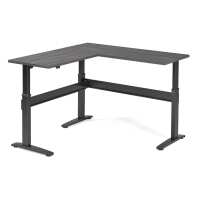
“I did a lot of research before making a decision on which standing desk manufacturer to purchase from. BTOD's blog is a great resource since it's difficult to find in depth information about the motors and leg assemblies. reddit/r/standingdesk is also a good resource. All of my research kept me coming back to the the VertDesk. Price is very comparable to other desks with lesser materials and motors. Shipping was a bit of a hassle, but that's not entirely BTOD's fault since they contract that out. Desk comes on a pallet, very secure, and safe from damage. Assembly instructions could be improved, especially calling out where there are no pre-drilled holes. BTOD should make a video for the L-shaped. I use the 72x30x72 desk at 46 inches with 3 monitors mounted on a VESA stand, a water cooled desktop, studio monitors, laptop, docking station, etc and 1-2 cats. At that height the desk is really solid, even on carpet. I love it! Thank you BTOD (K&A) for making such a great product here in the US!”
“I got everything delivered a couple of days ago and I got everything assembled and it works! I'm 6'-3", so with a foam topo standing pad, I have the desk run up to full height and it is just right. It might not be tall enough for really tall people, but should fit the majority. I go the L-shaped desk and really like that configuration. Beware that the shipment comes on a semi truck and they will deliver it on a pallet to the nearest curb unless you pay extra to have it carried inside. My office is upstairs in an office with no elevator and I didn't pay the extra to have it carted up the stairs. I recommend having two people available to take the delivery if possible. I managed, but it was a challenge. The desk itself is great! The L-shape of my desk makes it very solid extended to full height. The only reason I'm taking of a star is because of the assembly instructions. They are clear enough for someone who is reasonably handy, but I could see them being confusing for some people. The desk top was also missing pilot holes for the channel pieces and some of the other hardware. You can drill your own or just screw them directly to the wood, but that adds difficulty to the assembly process that could be avoided. The directions also instructed one to assemble everything with the desk turned upside down. This works great for assembly, but with the L-shaped desk there was know way I was going to get the assembled desk flipped over by myself. I opted to assemble everything upside down and then detach the two table tops, flip, and reattach in the rightside up position. The desk is brand new, so I'll have to see how it performs long term...”
“I am recommending it to everyone who inquires. Very sturdy. I have four monitors, two studio monitors, two laptops, a power supply, various cups, keyboards, chargers etc on it... the motors don't flinch. I've had it for months and adjust it daily. The laminate is durable, easy to clean, and the color is true to the photo in my case (driftwood). BTOD customer service was also five stars when I called for help.”
“Overall the project quality is absolutely 5/5 which is why I am giving this overall a 5/5. I do feel the installation instructions and overall setup for the L desk could be improved in a number of ways, however. If i could give 4.5/5 I would, but I don't want to drop down to 4/5.
Some of my struggles were:
- The legs are not labeled in any way themselves as to where they should be oriented, only the box they come in. For the L desk in particular with 3 legs, it can get tough to distinguish which leg can go where once you take it out of the boxes. It would seem to be simple enough to print this either etched into the leg, or on the already existing label showing the motor installation.
- The instructions are pretty confusing for the L setup desk. Overall it seems like the instructions were created from an approach of trying to create one guide for all possible desk permutations, which while efficient from a production standpoint is not efficient from an actual installation standpoint. I would strongly recommend taking the time and effort to create a specific installation guide for each type of desk and orientation. It should not be that costly to do something like this.
- The setup of the groove in the metal support for the hex rod is not great for the L desk in particular. The groove for passing through cables is only on one side of the support, but the location isn't conducive for running the wires in an efficient manner for the L desk. Reversing the orientation of the support results in the pre-drilled holes no longer lining up. For me, I simply pre-drilled my own holes for it but overall it was more of a headache than it should be. I would strongly recommend putting cord passthrough grooves on both ends of the metal support. An alternative would be setting up the support so that the slots for the screws will line up in the same spot no matter which way you orient it.
- The installation of the extension side leg and motor is a bit weird. You provide the metal support for the shorter side hex rod for the extension side but there is no hex rod to be supported, which resulted in some confusion on how the side motor should be setup. In an ideal world I'd love to see a setup that allows the hex rods to run from both sides fully into the back corner, but I realize the difficulty in setting that up. This would also require specific products for the L desk, where it appears that the overall setup is meant to allow for reuse of the same parts across all configurations just by shifting them around like lego pieces.
- There should be two metal brackets for the extension to attach the extension to the main part of the desk. The single extension creates a weak point on the exterior corner of the extension. I simply bought an extra brace to use, but it would be far preferable to simply have two brackets and pre-drilled holes provided for both brackets - one on the inner side and one on the outer side. This creates a far more stable connection and I was not comfortable with only one.
Overall I am very pleased with the finished product despite the early struggles and frustrations in installation. With the extra bracket, the desk is rock solid and goes up and down with no issues whatsoever even with a water-cooled desktop, four monitors, an Xbox One, a PS4, and a laptop all held on the desk. I believe the v3 is the first VertDesk to provide a L desk option, so a lot of my initial frustrations may just stem from this being the first product with the L desk offering that will be improved upon and resolved in future iterations.”